
Create custom fields, forms, and questions
|
NOTE: This video applies only to requisition Forms not managed with Data Objects. |
As the video below explains, there are many options to help you request exactly the type of information you need. In the photo below, you will see the options for Single Choice and Multiple Choices. These enable you to create a single or multiple choices with corresponding names.
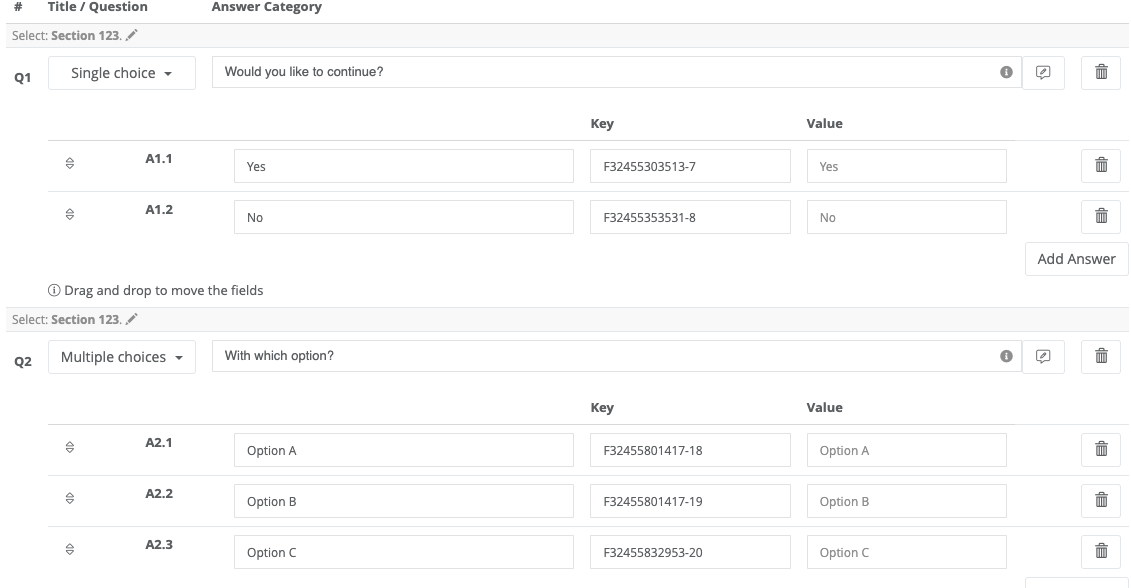
You can also create an Open question that, to the user, will show up as a text box to simply fill in their answer. A Text field is simply for information and will show to the user as a read out. Form is the most versatile field as it allows you to customize endless value types. You can learn more about Form fields, here.
OPTIONS AVAILABLE:

- Single Choice - ability to create a single choice type that can create forks of the process (from a simple YES/NO to a list of options)
- Multiple Choice
- Score - Give a rating selecting a stair option (1-5, 1-100 or custom)
- Form - This section allows you to create any kind of field, and to interact with Data Objects, existing tables of Virtus Flow and Connectors. Learn how to create Custom Forms
- Open Question - Creates a text box for them to answer in
- Table - allows you to create a table
- Use data generated from another workflow
- Child Workflow - A Child Workflow is a Workflow STEP built to be connected to different Workflows.
- PDF - It allows you to generate automatic PDF Documents from data in Virtus Flow.
- DOCX - It allows you to generate Microsoft Word document automatically from data in Virtus Flow. Learn how to create interactive DOCX documents with Virtus Flow.
- CSV - It allows you to import data from a CSV File and connect with the rest of the workflow/process.
- Text Section - If you need to add long descriptions like Terms and Conditions
To view a step-by-step of this process, please view the following video:
To further customize your Form, visit the following:
Connect Questions and Sections
How to Use the Form Type to Create Custom Fields
Comments
0 comments
Article is closed for comments.